Guides » Main » Guides » Improving Equipment
Ancestral Forge Overview
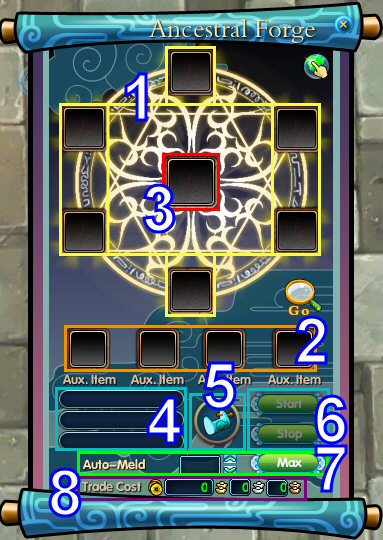
client guide| The Ancestral Forge is a near-perfect copy of the Celestial Forge in Heaven. As far as mortals know, it is just as powerful as its predecessor in Heaven, and no reason has ever been found to doubt that. Gear, Pets, Mounts... all of these things can be improved with the Ancestral Forge. Use your imagination along with the Ancestral Forge to create your own miracles! Functions available: Imbue Elements : Requires one piece of imbued armor and two Element Scrolls. Refinery : Melds two Gems into a superior quality gem with Smithery Goo. Soul Charge : Allows you to move the soul from armor into empty Soulstones. How to use 1. Main Material Slot: With the forge panel open, right-click on a main material in your Bag to put it in the slot. 2. Auxiliary Material Slot: With the forge panel open, right-click on an auxiliary material in your Bag to put it in the slot. 3. Preview Result: Click the lock icon at postion 5 to preview the result. 4. Requisite Vocation Skill: Here it shows the Vocation Skill needed for current operation. No Vocation Skills are required before level 60. 5. Lock: Click the lock icon, and the result preview will be displayed at postion 3. 6. Start and Stop: You must Lock before you start. During the process, you can click Stop to break. 7. Repeat: Sets the number of times you want to repeat the operation. Clicking Max will set this to the highest number you have the materials to make. 8. Fee: Click on the lock icon, and the money you must pay will be displayed. You cannot proceed with insufficient money. |
Ancestral Forge