Guides » Main » Guides » Chat
Chat
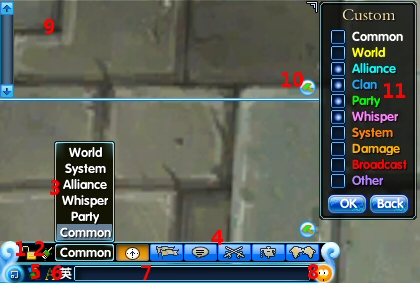
client guideChat Window:
1. Lock chat window
2. Clear chat window
3. Select the channel you want to view
4. Select the channel you want to speak in
5. Change background color of chat window
6. Change language input
7. Message field
8. Click to access emoticon menu
9. Customizeable chat window
10. Click to access the settings of the customizeable chat window
11. Options for the customizeable chat window.(Multiple choices available)